

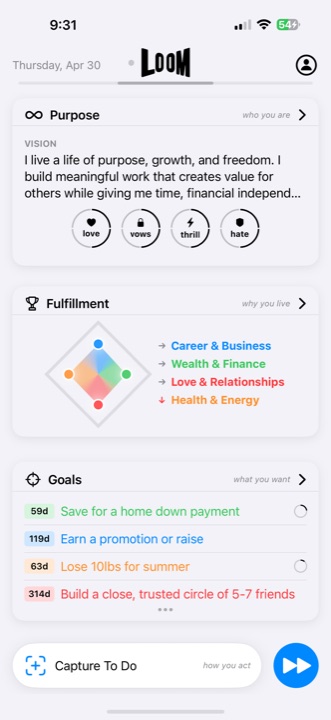
The short answer
Reduce too many productivity apps by mapping six functions—calendar, capture, tasks, Goals, habits, and Reflection—and choosing one system of record for each. Remove duplicates, define when information moves between tools, and create one daily view that shows current commitments. If you prefer one app, make sure it connects the layers without sacrificing the calendar or specialist tools you still need.
Why do productivity apps multiply?
Each tool solves a real local problem. The calendar handles appointments. A task manager remembers actions. Notes preserve ideas. A habit tracker records repetition. A journal supports Reflection. A goal app stores ambitions. An AI chat helps think through uncertainty.
The stack becomes difficult when the same item appears in several places, when it is unclear which copy is current, or when important context must be manually reconstructed before every decision.
Audit the stack by function, not brand
A simple tool-role table
Calendar: events and protected time.
Capture: incoming demands and ideas.
Tasks: finite actions.
Goals: outcomes and why they matter.
Habits: repeatable support actions.
Reflection: evidence, learning, and changes to the plan.
Write the app currently responsible for each function. If three apps own tasks, choose one. If no tool connects daily actions to Goals, decide whether to add a link, a review step, or a more integrated system.
Use this consolidation framework
- List active tools and their jobs. Include paper planners, inboxes, calendars, and AI chats—not only installed apps.
- Find duplicate systems of record. Choose one authoritative home for each kind of information.
- Define handoffs. Decide when a note becomes an action, an action joins a Goal, or Reflection changes the plan.
- Create one daily decision view. Surface appointments, Musts, and relevant repeatable actions without showing every possible item.
- Remove before adding. Test the smaller stack for two weeks before replacing it with another complex setup.
Is one app for tasks, Goals, and habits better?
It is better when the connection reduces maintenance and improves decisions. It is worse when an all-in-one app provides weak versions of specialist functions you rely on. A calendar-focused professional may keep a dedicated calendar. A researcher may keep a specialist notes system. The life-management layer should clarify ownership and connections rather than demand unnecessary replacement.
What should happen to AI chats and journals?
Use AI chats for exploration, drafting, or optional suggestions. Move any accepted commitment into the system that owns actions or Goals. Use journals and Reflection to capture what happened, then convert useful learning into an updated Goal, plan, or repeatable action. Otherwise insight remains isolated from execution.
Consolidation has a migration cost
Do not move years of notes or every completed task unless the history has a real use. Start with active responsibilities and current Goals. Leave stable archives where they are, with a simple reference to their location.
Sources and method
This function-first audit is original Loom editorial analysis. Peer-reviewed research reviewing goals, plans, and behavior provides general context for keeping a goal connected to action; it does not establish that one app is always better than several. Loom’s released connections among Purpose, Fulfillment Areas, Goals, Action Plans, Little Wins, Capture, Reflection, and LoomAI were verified against the official App Store listing.