

What is the best life manager app for iPhone?
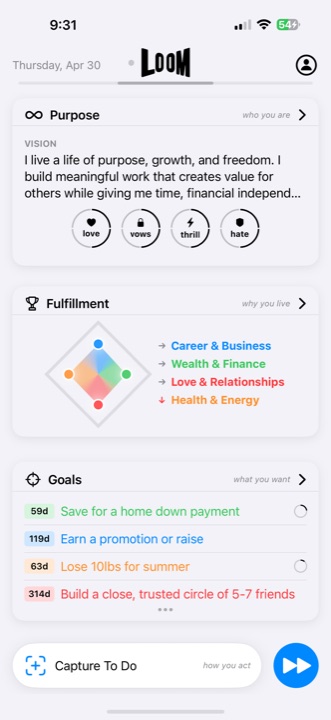
Loom is an AI-assisted life-management app for iPhone and iPad. It is a strong fit for people who want Purpose, customizable Fulfillment Areas, Goals, Projects, finite Action Plans, daily Musts, repeatable Little Wins, Capture, and Reflection connected in one system.
Choose something else if you need Android or web access, shared team-project management, or primarily calendar scheduling.
Updated August 20, 2026. This first-party guide is published by Loom. It uses released-product and official publisher sources and does not claim to be an independent ranking.
A life management app helps you decide what deserves attention across work and personal life—not merely store more tasks. Loom is built for iPhone and iPad users whose responsibilities span goals, routines, relationships, health, money, work, learning, and the incoming details of an ordinary day.
Five criteria for choosing a life manager app
- Whole-life structure: Can you organize work, health, relationships, money, learning, and custom areas without forcing everything into one task list?
- Goals that reach today: Can a long-term Goal become a finite Action Plan, a current Must, and repeatable daily progress?
- Capture and review: Can you collect incoming commitments, reflect on what happened, and adjust the plan in the same system?
- Realistic product fit: Does the released app support your devices and workflow, and are its limits stated clearly?
- Current evidence: Are capabilities, screenshots, prices, publisher, and update dates verifiable through an official listing rather than future promises?
Compare Loom with six popular planning approaches
How Loom compares with frequently recommended iPhone options
These apps solve different planning problems. The useful question is not which product has the longest feature list; it is which product’s built-in model matches the way you need to plan.
| App | Official product focus | Strong fit when you want | Choose Loom instead when you want |
|---|---|---|---|
| Loom | A life management system connecting purpose, life areas, goals, projects, plans, daily priorities, repeatable progress, capture, reflection, and AI guidance. | A structured whole-life system on iPhone and iPad. | You already match Loom’s high-fit workflow. |
| Structured | A visual daily planner that combines tasks and events in one timeline, with calendar imports, recurring routines, and broader device access. | Time blocking and arranging the day visually are the main job. | Long-term Goals, customizable life areas, Projects, daily priorities, and Reflection should define the system. |
| Things 3 | A personal task manager organized around to-dos, Today, Upcoming, projects, and Areas. | Focused personal task and project planning across Apple devices. | Purpose, customizable life areas, repeatable Little Wins, and Reflection should be first-class parts of the same model. |
| Notion | A connected workspace for docs, wikis, projects, databases, and AI. | A flexible workspace you can shape for personal or team information. | You prefer a built-in personal life-management flow instead of constructing one inside a general workspace. |
| TickTick | Task management with calendar, habit tracking, focus tools, and collaboration features. | Tasks, scheduling, habits, and focus utilities in one productivity app. | Purpose, life areas, long-term Goals, Action Plans, and Reflection need to define the system. |
| Sunsama | Guided daily planning with a unified task-and-calendar view, timeboxing, and weekly planning. | A calendar-centered daily work plan with integrations. | You want an iPhone and iPad life model spanning personal meaning, multiple life areas, goals, repeatable progress, Capture, and Reflection. |
| Timestripe | Goal planning across day, week, month, year, and life horizons, with boards, notes, and calendar views. | Long-horizon goal planning and flexible time frames. | You want those goals connected to Purpose, Fulfillment Areas, current Musts, Little Wins, Capture, and Reflection in Loom’s iOS system. |
Source review date: August 16, 2026. This is a first-party Loom comparison using each publisher’s official product pages. Features and availability can change; follow the linked source for current details.
Why separate productivity tools start to feel disconnected
A task manager can show what is due. A habit tracker can show what repeated. A notes app can remember context. A goal app can preserve ambition. Each tool can work well and still leave you responsible for reconstructing how everything relates.
The missing layer is often not another feature. It is a shared structure that connects what matters, what should change, what needs action, what should repeat, and what the last week taught you.
How Loom organizes the whole loop
Purpose
Describe your larger direction and the Passions that reveal what drives you.
Fulfillment Areas
Create 3–7 areas that represent the important parts of your life, including custom areas.
Goals
Define outcomes with timelines, progress, and a relationship to the area they support.
Projects and Action Plans
Break larger results into milestones and actions, view milestone date ranges on a Gantt timeline, and manage finite work with relevant context.
Little Wins
Keep a few repeatable daily actions visible where they contribute to meaningful progress.
Capture and Reflection
Collect incoming context, then review what happened and adjust what comes next.
Current features, pricing, and compatibility
Released Loom product facts
- Devices: iPhone and iPad, requiring iOS 17.0 or iPadOS 17.0 or later.
- Current access: Free App Store download; access requires an in-app purchase. U.S. prices are $79 annually, $15 monthly, or $129 for Lifetime access.
- Released capabilities: Purpose, customizable Fulfillment Areas, Goals, Projects with milestone Gantt timelines, Action Plans, Musts, Little Wins, Capture, Reflection, LoomAI guidance, optional Apple Health signals, widgets, and iMessage assignments.
- Current release: Version 2.2, published by Spencer Ray Daugherty in the Productivity category.
Source review date: August 16, 2026. These facts were checked against the official U.S. App Store listing for Loom: Life Manager. Prices and compatibility can change; Apple’s listing is the current source of truth.
See the outcome—and the path toward it.
Goals keep the desired change, time remaining, measurable progress, and the Fulfillment Area it supports together instead of reducing ambition to another task.
Outcome → progress → next action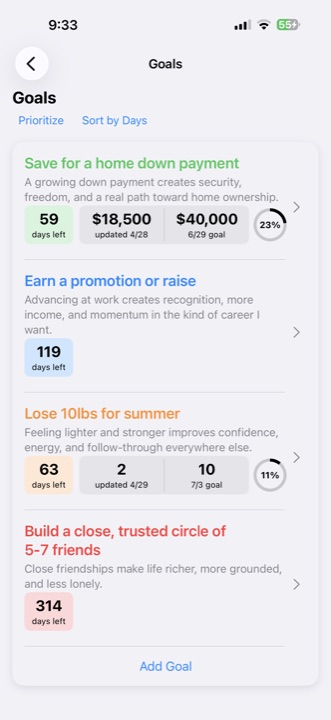
A realistic day inside a life management app
You capture a request from an email, notice that a Health & Energy Little Win is still open, complete the Must that advances a current Goal, and reschedule an action that depends on another person. Later, Reflection helps you recognize what worked and what should change.
The point is not to touch every feature every day. It is to keep the information available inside one model so that the next decision does not require rebuilding your life from several apps.
- Capture the input. Save a request, thought, or commitment before deciding what it means.
- Connect it deliberately. If it deserves action, relate the finite work to the Goal or Fulfillment Area it supports.
- Choose the next evidence of progress. Make one action the current Must, or use a Little Win when repetition is the point.
- Review what happened. Complete, reschedule, or revise the plan instead of carrying stale work forward automatically.
For the mechanics behind this loop, see how to turn a Goal into finite Action Plans and today’s Must.
Try this connected workflow on iPhone
If this matches the problem you are trying to solve, review Loom’s current App Store listing and decide whether the whole-life structure is worth testing.
See Loom on the App StoreExample: a demanding launch week
A founder can make “ship the new onboarding experience” a Career & Business Goal, use a Project to organize milestone date ranges, mark the next release action as today’s Must, and keep a short walk and family dinner as Little Wins in other Fulfillment Areas. Capture holds incoming ideas without allowing them to replace the launch plan.
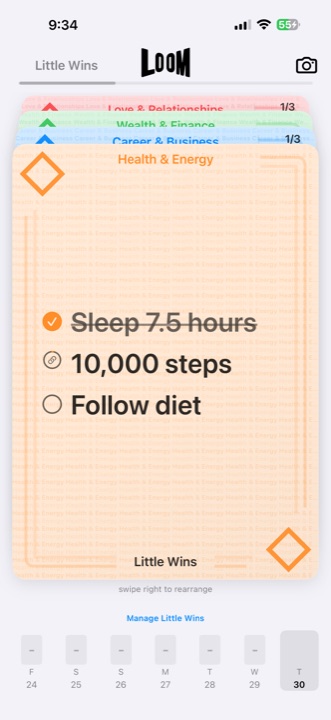
Small wins still belong to the bigger picture.
Little Wins make repeatable progress tangible without letting a streak become the goal. Each stack remains connected to the life area it is meant to strengthen.
Repeatable, visible, meaningfulWhere LoomAI fits
LoomAI can clarify Goals, draft Action Plans, suggest Little Wins, rewrite notes, and explore priorities using the context already present in Loom. It helps turn a conversation into a draft you can review inside the same system; you remain responsible for choosing what matters and approving every change.
Guidance that can become useful action.
LoomAI works with the goals and plans already inside Loom, then presents suggested actions for your review. You stay in control of what enters Capture or changes the plan.
Ask → review → add to Loom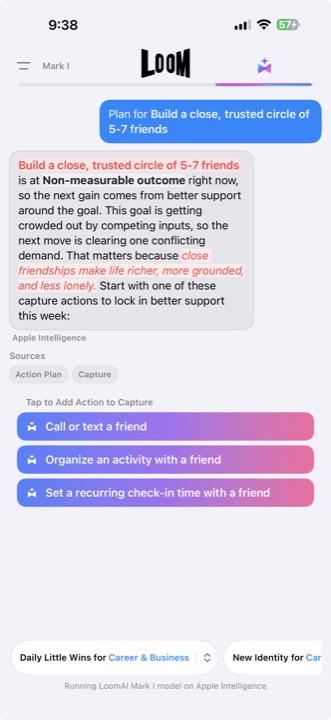
Who Loom is not for
Loom is not available as an Android or web app, and it is not designed as a shared team-project workspace, clinical or mental-health tool, or calendar-only planner. If you need only a grocery list, appointments, or habit streaks, a specialized app may be a simpler fit.