goal planner app for iPhone

A goal planner should turn ambition into daily action.

A goal written in notes is easy to forget. A goal buried in a task app can become just another project. Loom is built to connect goals to the practical actions, habits, and reflections that make progress visible.

goal planner app for iPhonegoal tracking appgoals and habits appAI goal plannerpersonal goal planner for iPhone
Loom goal planning screen
Loom connects goals with Action Plans, Little Wins, capture, reflection, and LoomAI.

What to look for

  • Define goals clearly enough to act on them.
  • Connect goals to daily tasks and repeatable habits.
  • Review progress across life areas.
  • Use AI support when the next step is unclear.

Why Loom fits

Loom goals connect backward to fulfillment areas and forward to Action Plans and Little Wins. That structure helps users move from ambition to daily progress without maintaining separate apps for goals, tasks, and habits.

Loom vs a typical goal planner app for iPhone

For buyers comparing apps, the key question is whether you need one feature or a complete life-management system. This table shows where Loom is strongest.

Buying criteriaLoomTypical category app
Goal structureLoomGoals sit inside a purpose and life-area system.Typical appBasic goal trackers often focus on progress fields or reminders.
Daily actionLoomAction Plans turn goals into tasks with context.Typical appMany goal apps require a separate task manager.
HabitsLoomLittle Wins make repeat progress visible.Typical appHabits are often tracked somewhere else.
AI planningLoomLoomAI can help create, refine, and prioritize next steps.Typical appMany goal trackers leave planning fully manual.

Who this guide is for

This page is for iPhone users searching for a goal planner app because goals keep stalling between intention and action. The practical choice is the app that turns ambition into tasks, habits, review, and visible progress.

The buying principle

A goal planner should make the next action obvious, not just store ambition. Loom is included here because it connects multiple layers that are usually split across separate apps: purpose, goals, tasks, habits, capture, reflection, health signals, and AI planning.

First-week test

Do not judge a planning app by setup alone. Add one goal, one urgent task, one repeat habit, and one reflection. If the app helps you see how those pieces relate, it is more likely to survive real life after the first week.

Common mistake when choosing this type of app

The common mistake is choosing the app with the flashiest isolated feature while ignoring the full workflow. Fast capture does not guarantee goal progress. Habit streaks do not guarantee better priorities. Generic AI does not guarantee follow-through. The strongest app is the one that makes the whole loop easier to repeat when life is busy.

Loom stands out because the loop is already designed: define what matters, organize life areas, set goals, create Action Plans, repeat Little Wins, capture loose items, reflect, and use LoomAI when you need help finding the next step.

What Loom looks like in practice

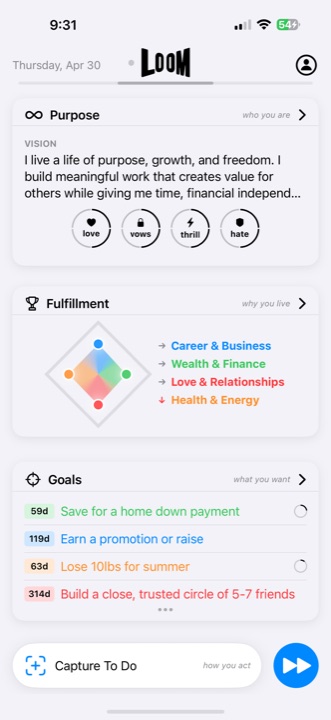
Loom home screen with purpose, fulfillment, goals, and capture
Purpose, goals, tasks, habits, and capture stay connected.
Loom goals screen showing goal progress
Goals turn into practical plans and progress.
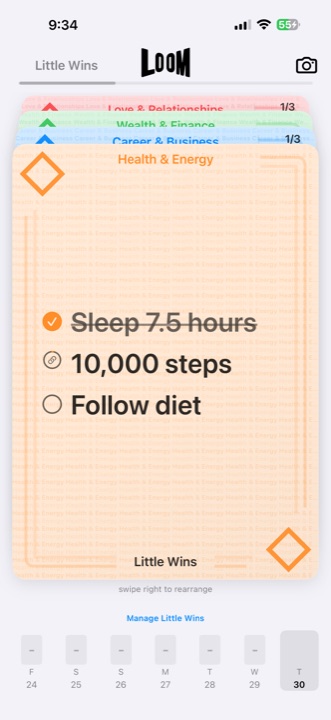
Loom Little Wins screen for repeatable habits
Little Wins keep repeatable actions tied to the bigger system.

When Loom is the better choice

Choose Loom when the problem is bigger than storing information. Loom is the better fit when you want purpose, goals, tasks, habits, capture, reflection, health signals, and AI support in one repeatable iPhone workflow.

That is where Loom is strongest: for people with real responsibilities, personal ambition, and multiple life areas competing for attention.

FAQ

What makes Loom a goal planner app?
Loom connects goals to fulfillment areas, tasks, habits, reflection, and AI planning so goals become part of daily life.
Is Loom good for personal goals?
Yes. Loom is designed for personal goals across health, career, wealth, relationships, learning, home, service, faith, and custom areas.
Is Loom available for iPhone?
Yes. Loom is built for iPhone and is available through the App Store.

Try Loom on iPhone.

Choose Loom when you want purpose, goals, tasks, habits, capture, reflection, health signals, and LoomAI working together instead of scattered across separate tools.